
How to Create Professional Invoices Using AI Voice (2026 Guide)

Running a freelance business or a growing company often means juggling multiple responsibilities—meeting clients, delivering projects, tracking payments, managing expenses, and creating invoices. While invoicing is essential for getting paid, it can also become one of the most repetitive and time-consuming administrative tasks.
Fortunately, artificial intelligence (AI) is changing that.
Instead of manually entering customer details, products, prices, taxes, and payment information, modern AI-powered invoicing tools allow you to create professional invoices simply by speaking naturally. In many cases, an invoice that once took 10–15 minutes to prepare can now be generated in less than 30 seconds.
Whether you’re a freelancer, consultant, contractor, designer, electrician, plumber, agency owner, or small business owner, AI voice invoicing can dramatically reduce paperwork and help you spend more time on the work that actually earns money.
In this comprehensive guide, you’ll learn:
- ✅ What AI voice invoicing is
- ✅ How AI creates invoices from your voice
- ✅ Why businesses are switching to AI invoice generators
- ✅ Step-by-step instructions for creating invoices using AI
- ✅ Best practices for faster and more professional invoicing
- ✅ Common mistakes to avoid
- ✅ How to choose the best AI invoice app in 2026
By the end of this guide, you’ll understand how voice-powered invoicing works and how it can help you invoice clients faster while maintaining a professional image.
Ready to create invoices in seconds?
Available on:
✅ Android: 👉 Download on Google Play
✅ iPhone & iPad: 👉 Download on the App Store
What Is AI Voice Invoicing?
AI voice invoicing is a modern way of creating invoices where you simply describe the work you’ve completed, and artificial intelligence automatically generates a professional invoice for you.
Instead of filling out multiple forms manually, you speak naturally, just as you would explain the job to a colleague.
For example, you might say:
“Create an invoice for John Smith. Website redesign for $1,200. Payment due in 15 days.”
An AI-powered invoice app can identify key details from your voice, including:
- Client name
- Products or services
- Quantity
- Price
- Due date
- Notes
- Purchase order number (if mentioned)
- Taxes (where applicable)
The app then organizes this information into a professionally formatted invoice that can be reviewed, edited if needed, and exported as a PDF or shared directly with your client.
This process reduces manual data entry while minimizing typing errors and helping businesses invoice customers more quickly.
Why AI Voice Invoicing Is Becoming Popular
Over the past few years, businesses have adopted AI tools for writing, customer support, scheduling, accounting, and document management. Invoicing is the next area being transformed.
Professionals increasingly want software that works at the speed of conversation. Speaking is often faster than typing, especially on a mobile device.
Imagine finishing a client meeting, getting into your car, and saying:
“Create an invoice for ABC Construction. Electrical repair, two hours of labor, one circuit breaker replacement, total $320.”
Within seconds, you have a polished invoice ready to review and send.
That level of convenience is why AI voice invoicing is gaining popularity among:
- Freelancers
- Consultants
- Contractors
- Designers
- Photographers
- Electricians
- Plumbers
- Agencies
- Small business owners
- Field service professionals
For anyone who spends more time with customers than behind a desk, voice-powered invoicing can be a significant productivity boost.
Why This Guide Matters
Many people are familiar with AI writing assistants, but far fewer know that AI can also simplify business administration. Voice-powered invoicing combines natural language processing with invoice automation, making it easier to create accurate, professional invoices from almost anywhere.
Whether you’re working from an office, a job site, or while traveling, understanding how AI voice invoicing works can help you reduce administrative work, improve consistency, and get paid faster.
In the next section, we’ll look at why traditional invoice creation often slows businesses down—and why so many professionals are looking for a better way.
Why Traditional Invoice Creation Is Slowing Businesses Down
Creating invoices should be simple. Yet for many freelancers, consultants, contractors, and small businesses, it remains one of the most repetitive and time-consuming administrative tasks.
Think about the typical process.
After completing a project, you often have to:
- Open your invoicing software
- Search for the client
- Enter invoice details
- Add products or services
- Calculate taxes
- Check due dates
- Review totals
- Export a PDF
- Attach it to an email or WhatsApp
- Finally send it to your client
While none of these steps are particularly difficult, together they consume valuable time—time that could be spent serving clients, closing new deals, or growing your business.
For professionals who invoice multiple clients every week, these small tasks quickly add up.
Imagine spending just 10 minutes creating each invoice.
If you send:
| Invoices Per Week | Time Spent |
|---|---|
| 5 | 50 minutes |
| 10 | 1 hour 40 minutes |
| 20 | 3 hours 20 minutes |
| 50 | More than 8 hours |
That means many businesses effectively lose an entire working day every month simply creating invoices.
The Hidden Cost of Manual Invoicing
The biggest cost isn’t the time spent typing.
It’s the interruptions.
Every time you stop your actual work to prepare invoices, your concentration shifts.
This constant context switching reduces productivity and makes even simple tasks feel exhausting.
Manual invoicing also increases the chances of errors such as:
- Wrong client information
- Incorrect invoice numbers
- Missing services
- Wrong tax calculations
- Incorrect totals
- Missing payment terms
- Forgotten due dates
- Typing mistakes
Even small mistakes can delay payments or require sending corrected invoices, creating extra work for both you and your client.
Why Mobile Invoicing Is Still Difficult
Most modern invoice apps offer mobile versions.
However, many still rely heavily on manual typing.
On a phone, creating an invoice often means navigating multiple screens, tapping numerous fields, and repeatedly switching between the keyboard and different sections of the app.
For busy professionals working on-site or traveling between clients, this process can be frustrating.
Imagine an electrician finishing a repair, a photographer completing an event, or a consultant wrapping up a meeting. They usually want to send the invoice immediately—not spend several minutes typing on a small screen.
This is where voice-based invoicing becomes especially valuable.
How AI Voice Invoicing Changes Everything
Instead of filling out forms one field at a time, AI allows you to describe the invoice naturally.
For example, you might say:
“Create an invoice for Sarah Johnson. Kitchen renovation consultation, $450. Payment due in 14 days.”
An AI-powered invoicing system can recognize:
- Client name
- Service description
- Price
- Due date
- Notes
- Taxes (when applicable)
It then organizes the information into a professional invoice ready for review and sharing.
This dramatically reduces manual work while maintaining accuracy.
Traditional Invoicing vs AI Voice Invoicing
| Traditional Method | AI Voice Invoicing |
|---|---|
| Manual typing | Natural speech |
| Multiple forms | One voice command |
| Repeated data entry | AI extracts information automatically |
| Higher chance of typing errors | Fewer manual mistakes |
| Slower on mobile devices | Designed for mobile-first workflows |
| 5–15 minutes per invoice | Often under 30 seconds |
| Repetitive process | Simple conversational experience |
The goal isn’t just to save time—it’s to make invoicing feel effortless.
Real-World Examples
Freelancer
Instead of opening multiple screens and entering project details manually, a freelance designer can simply say:
“Invoice David Wilson for logo design. $600. Due next Friday.”
The invoice is prepared within seconds.
Electrician
After completing a home repair:
“Invoice Robert Brown. Electrical repair, three hours of labor, circuit breaker replacement. Total $320.”
Instead of returning to the office later, the invoice is ready before leaving the customer’s property.
Consultant
Following a business meeting:
“Invoice ABC Consulting for strategy workshop. Six consulting hours. $900.”
The invoice can be reviewed and shared before the next appointment.
Photographer
Immediately after an event:
“Invoice Emma Davis for wedding photography. Final payment $1,500.”
No need to wait until returning home to prepare paperwork.
Why Speed Matters
Sending invoices quickly has another major advantage.
Businesses that invoice promptly are often paid sooner.
When invoices are delayed by several days, payments are also more likely to be delayed.
Creating invoices immediately after completing the work helps:
- Improve cash flow
- Reduce forgotten invoices
- Look more professional
- Keep project details fresh and accurate
- Encourage faster payments
AI voice invoicing makes this possible because it removes much of the administrative friction.
Who Benefits Most?
AI voice invoicing is particularly valuable for professionals who spend more time with customers than at a desk.
Examples include:
- Freelancers
- Consultants
- Contractors
- Plumbers
- Electricians
- HVAC technicians
- Landscapers
- Interior designers
- Photographers
- Marketing agencies
- Coaches
- Trainers
- Cleaning services
- Real estate professionals
- Small business owners
If your work happens away from a computer, voice invoicing can significantly reduce paperwork.
Is AI Replacing Traditional Invoicing?
Not at all.
AI isn’t replacing professional invoices—it simply changes how they’re created.
You still review the invoice before sending it.
You remain in control of:
- Pricing
- Taxes
- Discounts
- Notes
- Payment terms
- Branding
- Templates
The AI simply handles the repetitive work of turning your spoken instructions into a structured invoice.
Think of it as having a smart assistant that prepares the invoice for you.
Key Takeaways
Traditional invoicing has remained largely unchanged for years, requiring repetitive typing and manual data entry.
AI voice invoicing introduces a more natural approach by allowing users to describe the invoice conversationally. The software extracts the relevant details, generates a professional invoice, and dramatically reduces the time needed to complete the task.
For freelancers and small businesses, this means less paperwork, fewer errors, and more time to focus on serving clients and growing their business.
Step-by-Step Guide – How to Create Professional Invoices Using AI Voice
Knowing that AI can create invoices is exciting—but how does it actually work in practice?
The good news is that modern AI invoice apps have made the process incredibly simple. Instead of filling out multiple forms and typing every detail manually, you simply describe the invoice in plain English (or another supported language), and the AI organizes the information into a professional invoice.
Let’s walk through the complete process.
Step 1: Choose an AI Invoice App
The first step is selecting an AI-powered invoice application that supports voice or natural language invoice creation.
When comparing AI invoice apps, look for features such as:
- AI voice recognition
- Text-to-invoice generation
- Professional invoice templates
- PDF export
- Client management
- Product and service library
- Tax calculations
- Estimate creation
- Cloud backup
- Payment reminders
- Mobile support for Android and iPhone
A good AI invoice app should help you complete the entire process from creation to sharing without requiring multiple tools.
Step 2: Open the AI Invoice Feature
Most AI invoice apps provide two methods:
🎤 Voice Input
Speak naturally into your phone.
Example:
“Create an invoice for David Wilson. Website redesign. Two thousand dollars. Payment due in fifteen days.”
The AI converts your speech into structured invoice data.
⌨️ Text Input
If you’re in a quiet office or don’t want to use voice, simply type your request.
Example:
Invoice ABC Company for office cleaning services. Total $450. Due next Friday.
The AI processes typed instructions just as effectively.
Step 3: Let AI Extract the Details
This is where the real magic happens.
Instead of asking you to fill separate fields, the AI identifies important information automatically.
For example:
Your instruction:
“Create an invoice for Sarah Johnson. Logo design package. $750. Due August 15.”
The AI understands:
| Spoken Information | Invoice Field |
|---|---|
| Sarah Johnson | Client |
| Logo Design Package | Service |
| $750 | Price |
| August 15 | Due Date |
No manual typing required.
Step 4: Review the Invoice
Although AI is highly accurate, you should always review the generated invoice before sending it.
Check:
- Client name
- Invoice number
- Products or services
- Quantity
- Price
- Tax calculations
- Discounts
- Due date
- Payment instructions
- Notes
Think of AI as your assistant—not your replacement.
A quick review ensures everything is correct.
Step 5: Customize the Invoice
Most professional invoice apps allow you to personalize your invoices.
Common customization options include:
- Company logo
- Business name
- Signature
- Payment instructions
- Currency
- Invoice template
- Colors
- Tax information
Consistent branding helps your business appear more professional and trustworthy.
Step 6: Export as PDF
Once everything looks correct, generate a professional PDF.
PDF invoices are widely accepted because they:
- Look professional
- Maintain formatting
- Are easy to share
- Can be printed
- Work across all devices
Many AI invoice apps generate the PDF instantly.
Step 7: Send the Invoice
Now it’s time to deliver the invoice.
Popular sharing methods include:
- PDF download
- Shareable links (if supported)
The faster you send the invoice, the sooner your client can begin the payment process.
Example Workflow
Let’s look at a complete example.
Imagine you’re a freelance graphic designer.
You finish designing a company logo.
Instead of opening multiple forms, you simply say:
“Create an invoice for Bright Solutions. Logo design project. One thousand dollars. Due in seven days.”
The AI generates:
Invoice
Client:
Bright Solutions
Service:
Logo Design Project
Amount:
$1,000
Due Date:
7 Days
You review it.
Add your logo.
Export the PDF.
Share it with the client.
The entire process can take less than a minute.
Another Example: Contractor
Suppose you’re an electrician who has just completed a repair.
You say:
“Invoice Michael Brown for electrical repair. Three hours labor. One circuit breaker. Total $420. Due in fourteen days.”
The AI organizes:
Client:
Michael Brown
Service:
Electrical Repair
Labor:
3 Hours
Materials:
Circuit Breaker
Total:
$420
Due:
14 Days
Instead of waiting until you return to the office, the invoice is ready while you’re still on-site.
Tips for Better Voice Commands
To get the best results, speak naturally but include the essential details.
A good voice command should mention:
- Client name
- Service performed
- Amount
- Due date
Example:
Invoice ABC Marketing for social media management. Monthly retainer. $900. Due on the first of next month.
Avoid speaking too quickly or combining multiple unrelated jobs into one command.
Can AI Handle Multiple Services?
Yes.
Modern AI invoice apps can usually recognize multiple items in a single request.
Example:
Create an invoice for Green Homes.
Lawn maintenance $120.
Tree trimming $80.
Garden cleanup $50.
The AI can convert each service into a separate invoice line item, making the final invoice organized and professional.
Can You Edit the Invoice?
Absolutely.
AI creates the first draft.
You remain in full control.
You can change:
- Prices
- Quantities
- Taxes
- Discounts
- Notes
- Payment terms
- Templates
- Client details
This combination of automation and manual review provides both speed and accuracy.
Common Mistakes to Avoid
Even with AI, it’s worth avoiding a few common mistakes:
❌ Sending the invoice without reviewing it.
❌ Forgetting payment instructions.
❌ Using inconsistent invoice numbers.
❌ Leaving due dates blank.
❌ Forgetting taxes when required.
❌ Waiting several days before invoicing.
Small improvements in your invoicing process can have a meaningful impact on cash flow and client experience.
Why This Workflow Matters
The real advantage of AI voice invoicing isn’t just saving a few minutes.
It’s reducing repetitive administrative work so you can focus on what generates revenue.
Instead of thinking about paperwork, you can spend more time:
- Meeting clients
- Completing projects
- Winning new business
- Growing your company
That’s where AI creates the greatest value.
Key Takeaways
Creating professional invoices with AI voice technology is surprisingly simple.
The process involves speaking or typing your invoice details, allowing the AI to organize the information, reviewing the draft, and sharing a polished PDF with your client.
Compared with traditional manual invoicing, this workflow is faster, more convenient, and especially useful for freelancers, contractors, and small business owners who work away from a desk.
Best Practices, Common Mistakes, Security & Privacy
Creating invoices quickly is valuable, but creating professional, accurate, and secure invoices is even more important. Whether you’re a freelancer sending a few invoices each month or a growing business handling hundreds of clients, following best practices helps you get paid faster, avoid disputes, and build trust with customers.
In this section, we’ll look at the habits that separate professional businesses from everyone else.
Best Practices for Professional Invoicing
1. Send Invoices Immediately After Completing Work
One of the biggest reasons businesses experience delayed payments is delayed invoicing.
Many freelancers finish a project on Friday but don’t send the invoice until Monday—or even later.
Instead, create and send the invoice as soon as the work is complete.
Benefits include:
- Faster payments
- Better cash flow
- Fewer forgotten invoices
- More accurate service descriptions
- A more professional customer experience
AI voice invoicing makes this much easier because you can generate an invoice immediately after finishing a job, often before you even leave the client’s location.
2. Use Clear Service Descriptions
Avoid vague descriptions such as:
❌ Work Completed
❌ Consulting
❌ Design
Instead, be specific.
Better examples:
✅ Website Homepage Redesign
✅ Social Media Strategy Workshop (3 Hours)
✅ Kitchen Plumbing Repair
✅ Electrical Panel Inspection
Specific descriptions reduce confusion and help clients approve invoices more quickly.
3. Keep Your Branding Consistent
A professional invoice reflects your business.
Include:
- Company name
- Business logo
- Contact information
- Website (if applicable)
- Payment instructions
- Brand colors (where appropriate)
Consistent branding builds trust and makes your invoices easier for clients to recognize.
4. Always Include Payment Terms
Never assume clients know when payment is due.
Clearly state:
- Due date
- Payment methods
- Bank details or digital payment options
- Late payment policy (if applicable)
For example:
- Payment Due: 15 Days
- Payment Method: Bank Transfer or UPI
- Late Fee: 2% after due date (if applicable)
Clear payment terms reduce misunderstandings.
5. Review Every Invoice Before Sending
Even though AI can automate invoice creation, it’s still good practice to spend a few seconds reviewing the final document.
Check:
- Client name
- Invoice number
- Service descriptions
- Prices
- Discounts
- Tax calculations
- Due date
- Total amount
A quick review helps catch small errors before they reach your client.
Common Invoice Mistakes to Avoid
Even experienced business owners occasionally make invoicing mistakes.
Here are some of the most common ones.
❌ Incorrect Client Details
Double-check:
- Company name
- Contact person
- Billing address
- Email address
Sending an invoice to the wrong person can delay payment.
❌ Missing Invoice Numbers
Every invoice should have a unique invoice number.
Example:
INV-2026-001
INV-2026-002
Consistent numbering makes bookkeeping and tax reporting much easier.
❌ Forgetting Taxes
Depending on your country, invoices may need:
- GST
- VAT
- Sales Tax
- Service Tax
Always ensure your invoices comply with local tax regulations.
❌ Incorrect Due Dates
If the due date is missing or unclear, clients may delay payment simply because they don’t know when it’s expected.
Examples:
Payment Due: 7 Days
Payment Due: 15 Days
Payment Due: August 15, 2026
Clear dates are always better than vague wording.
❌ Sending Unprofessional PDFs
A poorly formatted invoice can reduce trust.
Avoid:
- Broken layouts
- Missing logos
- Inconsistent fonts
- Low-quality PDFs
Professional templates create a much better impression.
❌ Waiting Too Long to Invoice
This is surprisingly common.
When businesses delay invoicing:
- Clients may forget project details.
- Cash flow slows down.
- Revenue becomes harder to predict.
The sooner the invoice is sent, the sooner payment can begin.
Security & Privacy
As AI becomes more common in business software, many people ask an important question:
Is AI invoicing secure?
The answer depends on the software you choose and how you use it.
Here are some best practices.
Protect Client Information
Invoices often contain sensitive information such as:
- Client names
- Addresses
- Phone numbers
- Email addresses
- Purchase details
- Payment amounts
Choose software that protects this information with secure storage and encrypted communication where possible.
Use Strong Authentication
If your invoice app offers account protection features such as:
- Google Sign-In
- Apple Sign-In
- Two-factor authentication
- Secure cloud backup
enable them whenever available.
These features help reduce the risk of unauthorized access.
Keep Regular Backups
Although many modern invoice apps support cloud backup, it’s still a good idea to export important invoices periodically.
Having multiple copies of your business records provides extra peace of mind.
Understand AI’s Role
AI helps automate invoice creation, but it doesn’t replace your responsibility for reviewing financial documents.
Always verify:
- Prices
- Taxes
- Totals
- Client information
before sending the final invoice.
Think of AI as an assistant that speeds up your work—not a substitute for professional judgment.
Frequently Asked Questions About AI Security
Does AI store my voice permanently?
This depends on the application you use. Many apps process voice recordings only long enough to generate the invoice, while others may offer cloud history or backup features. Review the app’s privacy policy to understand how your data is handled.
Is AI accurate enough for business invoices?
Modern AI systems are highly capable of extracting information from natural language, but it’s still important to review the generated invoice before sending it. A quick review ensures pricing, taxes, and client details are correct.
Can AI calculate taxes automatically?
Many invoicing applications can apply tax rates automatically based on your settings. However, businesses should always confirm that calculations comply with their local tax requirements.
Future of AI Voice Invoicing
Voice invoicing is only the beginning.
Over the next few years, AI is expected to make invoicing even smarter by helping businesses:
- Detect missing invoice information
- Suggest payment reminders
- Generate estimates automatically
- Organize expenses
- Predict cash flow
- Summarize business performance
- Assist with tax preparation
- Automate recurring invoices
Instead of spending hours on administrative work, business owners will increasingly rely on AI assistants to handle repetitive tasks while they focus on serving customers and growing their businesses.
Key Takeaways
Creating professional invoices isn’t just about speed—it’s about accuracy, trust, and consistency.
By following simple best practices such as sending invoices promptly, using clear descriptions, reviewing AI-generated drafts, protecting client information, and maintaining professional branding, businesses can reduce errors, improve cash flow, and build stronger relationships with clients.
AI voice invoicing makes these best practices easier to follow by removing much of the repetitive manual work while keeping you in control of the final invoice.
How AI Voice Invoicing Helps Different Businesses
One of the biggest advantages of AI voice invoicing is its flexibility. Whether you’re working alone as a freelancer or managing a growing business, AI can simplify the way you create invoices and reduce the amount of time spent on paperwork.
Let’s look at how different professionals can benefit from AI-powered invoicing.
AI Voice Invoicing for Freelancers
Freelancers often wear multiple hats. In addition to delivering projects, they also need to find clients, manage revisions, respond to emails, track expenses, and send invoices.
Administrative work quickly eats into valuable billable hours.
Instead of opening an invoicing app and manually entering project details, AI allows freelancers to simply describe the completed work.
For example:
“Create an invoice for TechNova Solutions. UI design project. Final milestone payment of $850. Due in 14 days.”
Within seconds, the invoice is ready for review.
Benefits for Freelancers
- Spend more time on client work
- Invoice immediately after completing projects
- Reduce typing on mobile devices
- Maintain professional branding
- Get paid faster through timely invoicing
Perfect for:
- Graphic Designers
- Web Developers
- Writers
- Video Editors
- Digital Marketers
- SEO Consultants
- Business Consultants
- Coaches
AI Voice Invoicing for Small Businesses
Small businesses often handle multiple clients every day.
Whether you’re running a retail store, consulting agency, repair service, or local business, creating invoices manually can become repetitive.
Instead of assigning someone to prepare invoices, AI helps automate much of the process.
Business owners can simply say:
“Invoice Green Valley Apartments for monthly maintenance. $2,450. Due on the first of next month.”
The invoice is generated almost instantly.
Benefits
- Faster invoice creation
- Professional invoice templates
- Better cash flow
- Easier record keeping
- Less administrative work
AI Voice Invoicing for Contractors
Contractors usually spend more time at job sites than in offices.
After completing a project, the last thing most contractors want to do is sit down and type an invoice.
Instead, they can speak naturally.
Example:
“Invoice Robert Wilson. Kitchen remodeling. Labor $1,500. Materials $420. Due in 15 days.”
The invoice is generated while they’re still on-site.
Perfect for:
- General Contractors
- Renovation Companies
- Construction Businesses
AI Voice Invoicing for Electricians
Electricians often complete several service calls every day.
AI voice invoicing allows them to create invoices before leaving the customer’s property.
Example:
“Invoice Sarah Brown. Electrical inspection. Two ceiling fan installations. Total $360.”
Benefits include:
- Faster billing
- Less paperwork
- Improved professionalism
- Faster payments
AI Voice Invoicing for Plumbers
Plumbers frequently work in different locations throughout the day.
Instead of remembering job details later, they can invoice immediately.
Example:
“Invoice David Green. Water heater replacement. Labor $300. Parts $450.”
The invoice is ready before driving to the next customer.
AI Voice Invoicing for HVAC Technicians
HVAC professionals often perform installations, maintenance, and emergency repairs.
Voice invoicing helps document:
- Labor charges
- Replacement parts
- Maintenance services
- Inspection fees
without interrupting the workflow.
AI Voice Invoicing for Photographers
Photographers regularly invoice for:
- Weddings
- Events
- Portrait sessions
- Commercial shoots
Example:
“Invoice Emma Johnson. Wedding photography. Final payment $1,800.”
The invoice can be sent before leaving the venue.
AI Voice Invoicing for Interior Designers
Interior designers typically invoice across multiple project phases.
Instead of manually entering every milestone, they can describe the completed work naturally.
Example:
“Invoice Elegant Homes. Living room design consultation. Phase two payment. $950.”
AI organizes everything into a professional invoice.
AI Voice Invoicing for Marketing Agencies
Marketing agencies manage:
- Monthly retainers
- SEO projects
- Advertising campaigns
- Website development
- Social media management
Voice invoicing speeds up recurring billing.
Example:
“Invoice Bright Digital. Monthly SEO retainer. July services. $1,200.”
AI Voice Invoicing for Consultants
Consultants often bill based on:
- Hourly work
- Workshops
- Strategy sessions
- Advisory services
Instead of manually calculating invoices every week, AI helps generate them quickly.
Example:
“Invoice ABC Manufacturing. Six consulting hours. Strategy workshop. $900.”
AI Voice Invoicing for Cleaning Services
Cleaning businesses usually complete several jobs every day.
Voice invoicing allows cleaners to invoice immediately after finishing each location.
Example:
“Invoice Sunrise Apartments. Weekly cleaning service. $280.”
No paperwork required.
AI Voice Invoicing for Landscapers
Landscapers often provide:
- Lawn maintenance
- Tree trimming
- Garden cleanup
- Irrigation services
Example:
“Invoice Green Valley Residence. Lawn mowing. Tree trimming. Total $240.”
Everything becomes an organized invoice.
AI Voice Invoicing for Real Estate Professionals
Real estate agents and property managers invoice for:
- Brokerage services
- Property management
- Consulting
- Photography
- Documentation
Voice invoicing keeps billing simple while working on the go.
AI Voice Invoicing for Coaches & Trainers
Business coaches, fitness trainers, tutors, and mentors often invoice after each session.
Instead of typing details repeatedly:
“Invoice John Smith. Four personal training sessions. $320.”
The invoice is ready immediately.
AI Voice Invoicing for Agencies
Creative agencies usually invoice multiple clients every month.
Voice invoicing helps generate invoices for:
- Branding
- Design
- Development
- Advertising
- Consulting
while maintaining professional templates and branding.
Why Mobile Professionals Love AI Voice Invoicing
The biggest advantage isn’t AI itself.
It’s freedom.
Instead of waiting until the evening to create invoices, professionals can complete the task while the work is still fresh.
This means:
- Less paperwork
- Better accuracy
- Faster client communication
- Improved cash flow
- More time for revenue-generating work
For businesses that operate in the field, voice invoicing feels like having a personal administrative assistant in your pocket.
Can AI Help Growing Businesses?
Absolutely.
As businesses grow, invoicing becomes more complex.
Instead of creating dozens of invoices manually every week, AI helps teams:
- Save hours every month
- Standardize invoices
- Reduce errors
- Improve consistency
- Maintain professional branding
- Scale administrative tasks without increasing workload
For many businesses, AI isn’t just a convenience—it becomes an operational advantage.
Key Takeaways
AI voice invoicing isn’t limited to one profession.
Whether you’re a freelancer, contractor, consultant, agency owner, electrician, plumber, photographer, coach, or small business owner, speaking naturally is often faster than manually entering invoice details.
By reducing repetitive administrative work, AI allows professionals to focus on serving clients, growing their business, and getting paid sooner.
Best AI Invoice Apps in 2026
Artificial intelligence is transforming the way businesses manage invoicing. Instead of spending valuable time manually entering customer information, products, taxes, and payment terms, modern invoice apps can automate much of the process while maintaining a professional appearance.
However, not every invoice app is designed for the same type of user.
Some focus on accounting.
Others focus on freelancers.
Some emphasize bookkeeping.
A newer generation of apps focuses on AI-powered voice invoicing, helping professionals create invoices simply by speaking naturally.
Below are some of the most popular invoice apps available in 2026.
Comparison at a Glance
| App | Best For | AI Features | Voice Input | PDF Export | Android | iPhone |
|---|---|---|---|---|---|---|
| VoiceInvoicer | Freelancers & Small Businesses | ⭐⭐⭐⭐⭐ | ✅ | ✅ | ✅ | ✅ |
| Zoho Invoice | Businesses using Zoho ecosystem | ⭐⭐⭐ | ❌ | ✅ | ✅ | ✅ |
| FreshBooks | Accounting & Bookkeeping | ⭐⭐⭐ | ❌ | ✅ | ✅ | ✅ |
| Invoice Simple | Basic Invoice Creation | ⭐⭐ | ❌ | ✅ | ✅ | ✅ |
| Bookipi | Small Businesses | ⭐⭐⭐ | Limited | ✅ | ✅ | ✅ |
| Invoice2go | Mobile Invoicing | ⭐⭐ | ❌ | ✅ | ✅ | ✅ |
| Wave | Free Accounting | ⭐⭐ | ❌ | ✅ | ✅ | Web |
| QuickBooks | Full Accounting Suite | ⭐⭐⭐ | ❌ | ✅ | ✅ | ✅ |
1. VoiceInvoicer
Best for: Freelancers, consultants, contractors, field professionals, and small businesses looking for an AI-first invoicing experience.
VoiceInvoicer is designed around a simple idea:
Speak naturally and let AI generate your invoice.
Instead of filling multiple forms manually, users can describe the completed work, and AI extracts the relevant information to create a professional invoice.
Key Features
- AI voice invoice creation
- AI text-to-invoice generation
- Professional invoice templates
- Estimate creation
- PDF export
- Client management
- Product management
- Expense tracking
- Business reports
- Cloud backup
- Recurring invoices
- Payment reminders
- Multi-currency support
Best For
- Freelancers
- Contractors
- Electricians
- Plumbers
- Agencies
- Consultants
- Coaches
- Photographers
- Small businesses
Pros
✔ AI-powered voice invoicing
✔ Mobile-first experience
✔ Fast invoice creation
✔ Professional templates
✔ Modern interface
Considerations
VoiceInvoicer is focused on helping users create invoices quickly using AI. Businesses looking for enterprise accounting or payroll software may still need dedicated accounting platforms alongside their invoicing solution.
2. Zoho Invoice
Zoho Invoice is part of the broader Zoho ecosystem and integrates well with other Zoho business applications.
Strengths
- Time tracking
- Client portal
- Automation
- Good integrations
Best For
Businesses already using other Zoho products.
Limitations
The invoice creation process is still largely form-based rather than centered around conversational AI or voice input.
3. FreshBooks
FreshBooks combines invoicing with accounting and expense management.
Strengths
- Accounting features
- Time tracking
- Expense management
- Reporting
Best For
Freelancers who need invoicing together with bookkeeping.
Limitations
The focus is accounting rather than AI-powered invoice creation.
4. Invoice Simple
Invoice Simple has become popular because of its straightforward interface.
Strengths
- Easy to learn
- Professional invoices
- PDF export
Best For
Users who only need basic invoice creation.
Limitations
Limited AI capabilities compared with newer AI-first invoice apps.
5. Bookipi
Bookipi offers invoicing and estimates for freelancers and small businesses.
Strengths
- Mobile invoicing
- Estimates
- Expense tracking
Best For
Service businesses looking for a simple mobile solution.
Limitations
Voice automation is limited compared with AI-first platforms.
6. Invoice2go
Invoice2go focuses on mobile invoice management.
Strengths
- Mobile interface
- Estimates
- Branding
Best For
Small businesses needing basic mobile invoicing.
Limitations
Less emphasis on AI automation.
7. Wave
Wave is well known because it offers free accounting tools.
Strengths
- Free accounting
- Basic invoicing
- Expense tracking
Best For
Small businesses on a limited budget.
Limitations
Businesses looking for advanced AI features may find the automation more limited.
8. QuickBooks
QuickBooks is one of the most widely used accounting platforms in the world.
Strengths
- Accounting
- Payroll
- Inventory
- Financial reporting
Best For
Medium and large businesses requiring comprehensive financial management.
Limitations
Its extensive feature set can feel overwhelming for users who simply want to create invoices quickly on their phone.
Which AI Invoice App Should You Choose?
The right choice depends on your workflow.
Choose VoiceInvoicer if you:
- Want to create invoices by voice
- Prefer an AI-first experience
- Need a fast mobile workflow
- Create invoices while visiting clients
- Want modern invoice templates
- Need estimates, reminders, and recurring invoices in one app
Choose Zoho Invoice if you:
- Already use the Zoho ecosystem
- Need business integrations
Choose FreshBooks if you:
- Need accounting together with invoicing
Choose Wave if you:
- Want free accounting tools
Choose QuickBooks if you:
- Need enterprise-level accounting and financial management
Why AI-First Invoicing Is the Future
Traditional invoice software expects users to adapt to the software.
AI-powered invoice software works the opposite way.
Instead of navigating dozens of fields, users simply describe what they need.
This conversational approach dramatically reduces administrative work while making invoice creation more accessible on mobile devices.
As AI technology continues to improve, voice-first workflows are likely to become a standard part of business productivity software.
Final Recommendation
There isn’t a single “best” invoice app for everyone.
The ideal choice depends on your business size, workflow, and priorities.
If your goal is comprehensive accounting, platforms like QuickBooks or FreshBooks may be appropriate.
If you primarily need fast, mobile-friendly invoicing powered by conversational AI, VoiceInvoicer offers a unique approach by allowing you to create professional invoices simply by speaking naturally.
For freelancers, contractors, consultants, and small businesses that value speed and simplicity, that workflow can save time every single day.
Key Takeaways
Modern invoice apps are no longer just digital versions of paper invoices.
The newest generation uses AI to automate repetitive work, making invoice creation faster, more accurate, and easier than ever before.
Choosing the right solution depends on whether you value accounting features, ecosystem integrations, or AI-powered productivity.
For businesses looking to spend less time on paperwork and more time serving clients, AI voice invoicing represents one of the most exciting developments in business software today.
Why We Built VoiceInvoicer (And How It Makes Invoicing Faster)
After exploring how AI voice invoicing works and comparing some of the leading invoice apps available today, you may be wondering:
Is there an app that is designed specifically around AI voice invoicing instead of simply adding AI as another feature?
That question is exactly why VoiceInvoicer was created.
Instead of starting with a traditional invoice application and adding AI later, VoiceInvoicer was designed around one simple philosophy:
Creating an invoice should feel as natural as having a conversation.
Rather than spending several minutes typing customer information, products, prices, taxes, and notes, you simply describe the completed work.
The AI does the repetitive work.
You stay focused on your business.
Why We Created VoiceInvoicer
Most invoice applications available today are excellent at managing invoices once you’ve entered all the information.
However, many still expect users to:
- Open multiple screens
- Fill numerous forms
- Navigate several menus
- Type every product manually
- Search for clients
- Add invoice details one field at a time
For professionals working in the real world—not behind a desk all day—that process can interrupt their workflow.
Imagine finishing a repair, completing a consultation, or wrapping up a design project.
The last thing you want is another 10 minutes of administrative work.
VoiceInvoicer was built to reduce that friction.
Designed for Busy Professionals
VoiceInvoicer isn’t intended only for accountants.
It’s designed for people who spend most of their day working with customers.
Including:
- Freelancers
- Consultants
- Contractors
- Electricians
- Plumbers
- HVAC technicians
- Interior designers
- Photographers
- Coaches
- Marketing agencies
- Small businesses
- Service professionals
If you’re constantly moving between clients, voice-first invoicing simply makes more sense than typing every invoice manually.
How VoiceInvoicer Works
Creating an invoice with VoiceInvoicer is designed to be simple.
Step 1
Tap
Create AI Invoice
Step 2
Speak naturally.
Example:
Create an invoice for ABC Marketing.
Website redesign.
$2,500.
Due next Friday.
Step 3
VoiceInvoicer’s AI extracts:
- Client
- Services
- Amount
- Due date
- Notes
Step 4
Review the generated invoice.
If needed, make changes.
Step 5
Export a professional PDF.
Step 6
Share via:
The entire workflow is designed to take less than a minute.
Features That Make VoiceInvoicer Different
Unlike many traditional invoice applications, VoiceInvoicer combines AI-powered invoice creation with a complete business invoicing workflow.
Some of the key features include:
🎤 AI Voice Invoice Creation
Create invoices simply by speaking naturally.
No complicated forms.
No unnecessary typing.
🤖 AI Text-to-Invoice
Prefer typing?
Describe the job in plain language.
The AI creates the invoice for you.
📄 Professional PDF Invoices
Generate polished invoices using modern templates suitable for freelancers, consultants, contractors, and businesses.
📑 AI Estimates
Need to send a quotation before starting work?
Create professional estimates using AI and convert them into invoices later.
👥 Client Management
Store customer information once.
Reuse it whenever you create future invoices.
📦 Product & Service Library
Save frequently used services and products to speed up invoice creation.
💰 Expense Tracking
Record business expenses in one place.
Track spending and organize expenses by category.
📊 Business Reports
Monitor:
- Revenue
- Outstanding payments
- Paid invoices
- Overdue invoices
- Expenses
without exporting data to another application.
🔁 Recurring Invoices
Perfect for businesses with monthly clients.
Automatically generate recurring invoices on your preferred schedule.
☁️ Secure Cloud Backup
Keep your business data safe and synchronize it across supported devices.
🌍 Multi-Currency Support
Support customers around the world using multiple currencies.
🌎 Multiple Languages
Create invoices in your preferred language and serve clients in different regions.
Designed for Android and iPhone
Whether you use Android or iPhone, VoiceInvoicer provides a consistent mobile-first experience.
The interface has been optimized for:
- One-handed use
- Fast navigation
- Quick invoice generation
- Simple sharing
- Professional presentation
Because many professionals create invoices while working on-site, every interaction is designed to reduce taps and save time.
Screenshot Walkthrough
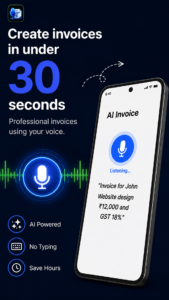
Create invoices in under 30 seconds
Show your AI voice invoice screen.
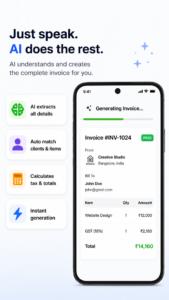
Speak naturally
AI understands your request.
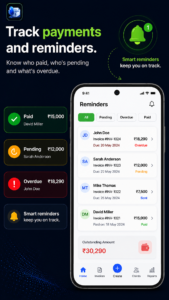
Track payments
Monitor paid, pending, and overdue invoices.
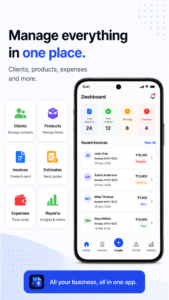
Manage everything
Clients
Products
Expenses
Reports
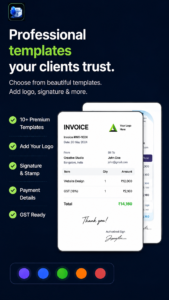
Professional invoice templates
Customize invoices with your branding.

Built for freelancers and small businesses
Highlight speed, simplicity, and professionalism.
Who Should Use VoiceInvoicer?
VoiceInvoicer is ideal for professionals who value speed, simplicity, and mobility.
It works particularly well for:
- Freelancers
- Consultants
- Contractors
- Electricians
- Plumbers
- Interior Designers
- Photographers
- Coaches
- Marketing Agencies
- Cleaning Services
- Landscaping Businesses
- Property Managers
- Small Business Owners
If your day is spent working with customers rather than sitting behind a computer, VoiceInvoicer can significantly reduce the time spent on paperwork.
Download VoiceInvoicer
Create professional invoices using AI voice in under 30 seconds.
Available on:
✅ Android
✅ iPhone & iPad
Our Vision
We believe invoicing should never interrupt your work.
Artificial intelligence should remove repetitive tasks—not add complexity.
VoiceInvoicer was built with that philosophy in mind.
Whether you’re sending one invoice each week or hundreds every month, our goal is to help you spend less time on administration and more time doing what you do best.
Key Takeaways
VoiceInvoicer combines AI-powered voice technology with professional invoicing tools to create a faster, simpler workflow for freelancers and small businesses.
Instead of replacing your expertise, the app handles repetitive administrative work so you can focus on serving clients, completing projects, and growing your business.
If you’ve been looking for a modern, AI-first approach to invoicing, VoiceInvoicer is designed to make that experience as natural as possible.
Author
Author: Anil Sharma, Founder of ApptureX and creator of VoiceInvoicer.
“While building VoiceInvoicer, I spoke with freelancers, consultants, and small business owners who shared the same frustration: creating invoices on a phone was slow and repetitive. Those conversations shaped the app’s voice-first workflow and inspired many of the ideas discussed in this guide.”
FAQs
What is AI voice invoicing?
AI voice invoicing allows you to create professional invoices by speaking naturally instead of manually filling out forms. The AI identifies key details such as the client name, services, prices, and due dates, then generates a complete invoice ready for review and sharing.
Can AI really create invoices accurately?
Modern AI invoice apps are highly capable of extracting information from natural language. However, it’s always recommended to review the generated invoice before sending it to ensure pricing, taxes, and client details are correct.
Is AI voice invoicing suitable for freelancers?
Yes. Freelancers often manage client work, marketing, and administration on their own. AI voice invoicing helps reduce repetitive paperwork so they can spend more time on billable work.
Can contractors and field workers use AI voice invoicing?
Absolutely. Contractors, electricians, plumbers, landscapers, HVAC technicians, and other field professionals can create invoices immediately after completing a job without returning to the office.
Do AI invoice apps support PDF invoices?
Most modern invoice apps allow invoices to be exported as professional PDF documents that can be shared via email, WhatsApp, or other messaging platforms.
Can I create estimates using AI?
Many AI-powered invoicing applications also support estimates and quotations, allowing users to convert approved estimates into invoices later.
Is AI invoicing available on Android and iPhone?
Is AI invoicing available on Android and iPhone?
Is my business data secure?
Security depends on the application you choose. Look for features such as encrypted communication, secure cloud backups, and trusted sign-in options. Always review the app’s privacy policy before storing business information.
Can I edit AI-generated invoices?
Yes. AI creates the initial draft, but you remain in full control. You can edit client details, services, prices, taxes, notes, and payment terms before sending the invoice.
Which businesses benefit most from AI voice invoicing?
AI voice invoicing is particularly useful for:
Freelancers
Consultants
Contractors
Electricians
Plumbers
Designers
Photographers
Coaches
Agencies
Small businesses
Field service professionals
Can AI invoice apps calculate taxes?
Many invoice apps allow you to configure tax rates and automatically calculate taxes on invoices. You should still verify that calculations meet the legal requirements in your country or region.
Why is sending invoices quickly important?
The sooner an invoice reaches your client, the sooner the payment process can begin. Prompt invoicing also reduces the risk of forgotten project details and helps improve cash flow.
Can AI replace accounting software?
Not entirely. AI invoice apps focus on creating invoices efficiently. Businesses that require payroll, inventory management, or advanced accounting may still use dedicated accounting software alongside their invoicing app.
Is voice invoicing better than manual invoicing?
For many professionals, yes. Speaking is often faster than typing, especially when creating invoices on a mobile device. Voice invoicing reduces repetitive data entry and helps users invoice clients more quickly.
What should I look for in an AI invoice app?
Consider features such as:
AI voice invoice creation
Text-to-invoice support
Professional templates
PDF export
Estimate creation
Client management
Product catalog
Expense tracking
Payment reminders
Cloud backup
Multi-currency support
Mobile apps for Android and iPhone
Final Thoughts
Artificial intelligence is transforming the way businesses handle everyday administrative tasks, and invoicing is one of the areas seeing the greatest improvement.
Instead of spending valuable time filling out forms, copying client information, and manually calculating totals, professionals can now create polished invoices using natural voice commands or simple text descriptions.
Whether you’re a freelancer managing a handful of clients or a growing business handling dozens of invoices every week, AI voice invoicing can help reduce repetitive work, improve consistency, and speed up your billing process.
The goal isn’t to replace your expertise—it’s to remove unnecessary administration so you can focus on the work that matters most.
If you’re ready to experience a faster, more intuitive way to invoice your clients, explore an AI-powered solution like VoiceInvoicer and see how much time you can save.
